
E2E encrypted patient health data

Share this post

Where therapists do their best work.

At TINA, protecting the privacy of patient health data is a core priority. TINA’s End-to-End Encryption (E2EE) feature is designed so that sensitive information is encrypted in the user’s browser before it is sent to the server. Encrypted data remains protected while it is transmitted and stored. Authorized users unlock access with the organization’s E2EE PIN.
What Is End-to-End Encryption?

End-to-End Encryption is a security model in which data is encrypted before it leaves the user’s device and decrypted only on an authorized device.

In TINA:

  1. Sensitive fields are encrypted locally in the browser.
  2. The encrypted values are sent to the TINA API.
  3. The server stores and returns the encrypted values.
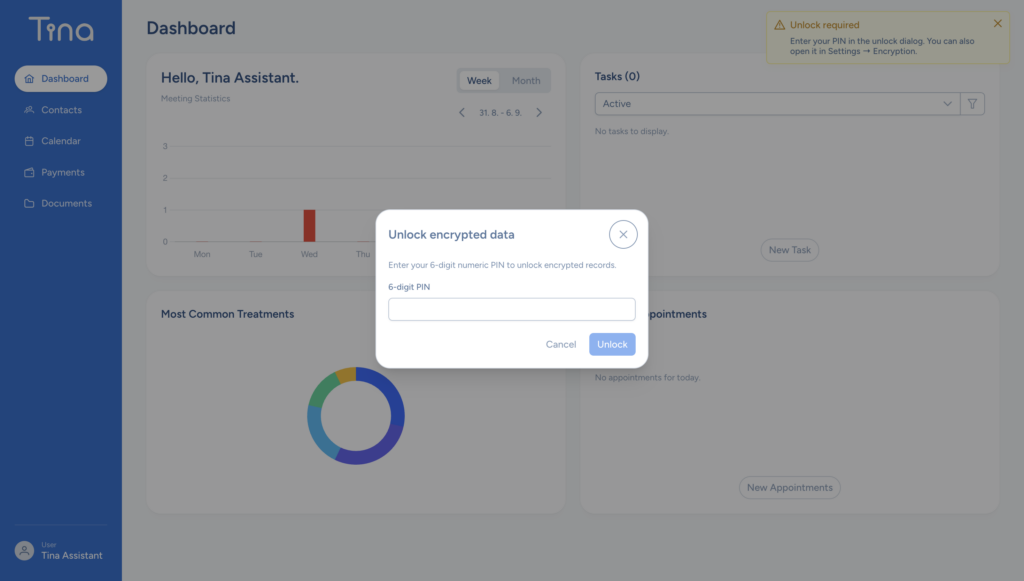
  4. An authorized user enters the organization’s E2EE PIN.
  5. The browser uses that PIN to decrypt the data.

This means the PIN is not transmitted to the server, and the server does not need the unencrypted data key to store or transport protected patient information.

Why Use E2EE for Patient Data?

Patient records often contain highly sensitive information, including clinical notes, contact details, treatment information, and other health-related data. Encrypting these fields before transmission provides an additional layer of protection.

Protection Against Unauthorized Access

If encrypted application data is accessed without the corresponding encryption key, the protected fields cannot be read directly.

Privacy During Transmission and Storage

Sensitive fields remain encrypted in API payloads and in the application data handled by the server. HTTPS/TLS continues to protect the network connection, while E2EE provides an additional client-side encryption layer.

Controlled Access

Only a user who has access to the organization and knows the organization’s E2EE PIN can unlock the shared encryption key in the browser.

Support for Secure Multi-Device Access

The PIN is associated with the organization rather than only one computer. This allows authorized users to unlock the same organization data from another browser or device using the correct E2EE PIN.

Setting Up E2EE in TINA

Step 1: Sign In as an Authorized Organization User

An authorized organization user signs in to TINA and opens the encryption settings.

Depending on the organization’s current setup, TINA may offer the option to:

  • Set up a new E2EE PIN
  • Import existing legacy encryption key material
  • Unlock an existing E2EE configuration

Step 2: Set an E2EE PIN

The user creates and confirms a six-digit numeric E2EE PIN.

Step 3: Unlock E2EE on Each Device

When the user signs in from another computer or browser the user enters the same E2EE PIN. The browser then makes the session ready to decrypt protected information.

Using E2EE on a New Computer

E2EE is designed to support access from multiple devices. When opening TINA on a new computer:

  1. The user signs in normally.
  2. TINA displays the E2EE unlock prompt.
  3. The user enters the organization’s six-digit E2EE PIN.
  4. The browser decrypts the data key in memory.
  5. Protected information becomes available to the unlocked session.

Legacy Encryption Key Support

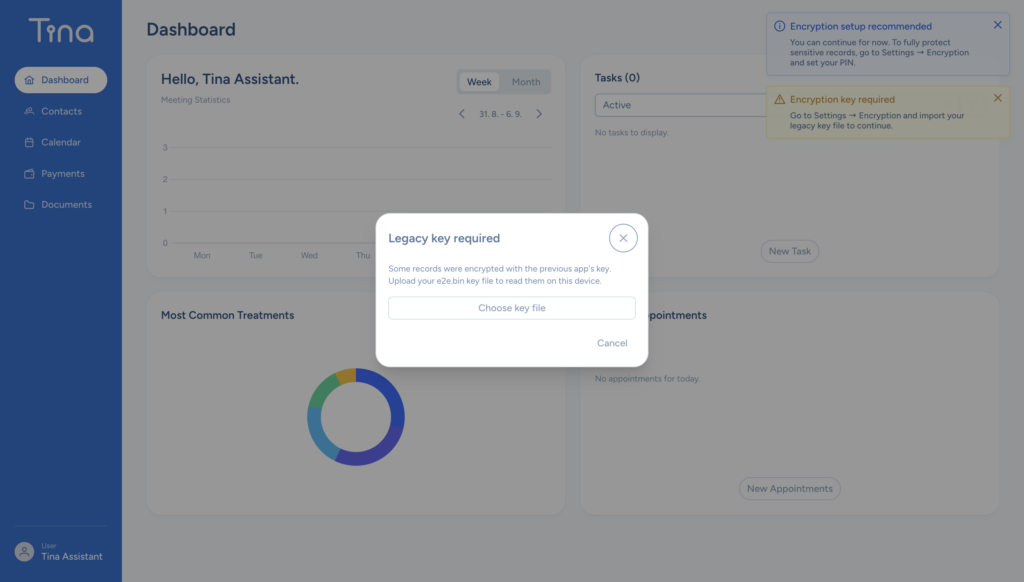
TINA also supports legacy encryption key material during the migration process.

Legacy key material can be imported when required and is held in the browser’s session storage for backward compatibility. Users with legacy encryption configured are encouraged to enroll a v2 E2EE PIN. The v2 PIN-based process is the preferred approach for new setups.
What Happens When the Session Is Locked?

When E2EE is locked:

  • Protected values may remain encrypted in the interface.
  • TINA can still perform operations that do not require decryption.
  • Sensitive write operations must wait until the user unlocks E2EE.
  • The in-memory encryption context is unavailable.

After the correct PIN is entered, the browser restores the encryption context and protected read and write operations can continue.

Important PIN and Key Management Guidance

The current E2EE PIN is a six-digit numeric PIN. This makes it easy to use, but it also means that PIN security depends on keeping the PIN protected. For better security:

  • Do not share the PIN through insecure channels.
  • Do not reuse the E2EE PIN as an account password.
  • Do not store the PIN in a browser, password field, document, or unencrypted note.
  • Use a PIN that is difficult for other organization members to guess.
  • Limit access to organization accounts and administrator settings.
  • Notify TINA support if the PIN may have been exposed.
  • Keep account passwords and E2EE PINs separate.

Troubleshooting E2EE

The Unlock Prompt Appears on a New Device

This is expected. The new browser does not have an active in-memory encryption context yet. Enter the organization’s E2EE PIN to unlock it.

The PIN Is Rejected

Confirm that:

  • The PIN contains exactly six digits.
  • You are using the organization’s current E2EE PIN.
  • The account belongs to the correct organization.
  • The organization’s E2EE configuration has not recently been changed.

Legacy Key Material Is Required

If the organization has not migrated from the legacy setup, an administrator may need to import the existing legacy key material before enrolling the v2 PIN. If you did not and it shows up please contact our support team.

The PIN Has Been Lost

The PIN is not sent to TINA and cannot be recovered from the server. Contact TINA support before changing or resetting the organization’s encryption configuration. Do not create a new encryption key until the existing data-recovery options have been reviewed, because a new key may not decrypt data protected with the previous key.

Conclusion

TINA’s E2EE feature adds client-side protection for sensitive patient information. Sensitive fields are encrypted in the browser, and the raw PIN is never stored or transmitted.

Authorized users can access protected data from multiple devices by entering the organization’s E2EE PIN, while the usable encryption key remains available only in the browser’s active unlocked session.

For setup assistance or questions about migrating legacy encryption keys, contact TINA support.

Related posts

[read_time]

Invoicing is a crucial aspect of managing a therapy practice, as it not only ensures that you are compensated for ...

[read_time]

The TINA app is designed to streamline the management of your therapy practice, from client intake to invoicing. Here’s a ...

[read_time]

Logging in to TINA is a simple process that combines account authentication with an additional End-to-End Encryption (E2EE) unlock step. ...

[read_time]

At TINA, protecting the privacy of patient health data is a core priority. TINA’s End-to-End Encryption (E2EE) feature is designed ...

[read_time]

Transcribing audio notes in TINA offers several benefits that can significantly improve your workflow and client management. Transcribing audio therapy ...

[read_time]

We’re dedicated to improving the therapy experience by introducing SMS reminders that ensure your clients never miss a session again. ...

Privacy Policy

In accordance with the GDPR, we inform you that we have adapted our communications to comply with the regulations on the protection of personal data. Your personal data will only be processed for the purposes with which you expressly consent. Consent to the transfer of personal data is voluntary and you can also withdraw your consent at any time in the same way as you gave it. If you do not provide personal data or withdraw your consent, Centrum cognitio d.o.o. will not be able to fulfil the purpose for which the data was collected. In addition, you have the right to access the data, the right to rectification, the right to erasure (“right to be forgotten”), the right to restriction of processing, the right to contract and the right to data portability. To exercise the aforementioned rights or in the event of a complaint, please contact the Personal Data Protection Officer, otherwise contact the address for: Data Protection Officer, Centrum cognitio d.o.o., Šarhova ulica 34, 2000, Slovenia or on e-mail: [email protected].

If you believe that the processing of personal data violates provisions on the protection of personal data, you have the right to lodge a complaint with the Information Commissioner.

The data will be kept until your withdrawal or for as long as necessary to achieve the purpose for which the data was collected.

The controller, the company Centrum cognitio d.o.o., undertakes to process and protect the data in accordance with the Personal Data Protection Act and the provisions of Regulation (EU) 2016/679 of the European Parliament and of the Council.

We use the MailChimp marketing platform for the purposes of electronic notification. By registering or filling out the form, you agree that we manage your data under the above conditions and that the information you provide us is simultaneously transmitted to MailChimp, which provides us with this service. The company Centrum cognitio d.o.o. will ensure that MailChimp provides the same level of protection of personal data as required by local and European legislation, in particular by signing EU standard contractual clauses, unless otherwise specified in individual cases.

Cookie policy

Cookie policy

The Electronic Communications Act (Official Gazette No. 109/2012), ZEKom-1, has incorporated rules on the use of cookies and similar technologies to shop or access information stored on users’ computers, tablets or mobile devices into the legal system.

Our website may place a so-called “cookie” on your computer’s browser.

What are cookies?

Cookies are small text files that give us information about how often a person visits our website and what content the user views. Cookies are not harmful and are always temporary. The cookies themselves do not contain any data that would allow a person to be identified. You always have the option to accept or reject cookies. Most web browsers accept cookies automatically, which you can change in the settings so that your computer rejects cookies or you receive a warning before a cookie is stored.

Strictly necessary cookies

These are cookies that are necessary for the proper functioning of the website and without which the transmission of the message on the communication network would not be possible. These cookies enable user-friendly online services, a better user experience and do not require consent.

 Google Analytics

Our website uses Google Analytics, a web analytics service provided by Google. Google Analytics uses cookies to analyse how users use the website. The information obtained by the cookie about your use of the website (including your IP address) will be transmitted to and stored by Google [on servers in the United States]. Google will use this data for the purpose of evaluating your use of the website, compiling reports on website activity for website operators and providing other services relating to website activity and internet usage. Google may also transfer this data to third parties where required to do so by law, or where such third parties process the data on Google’s behalf. Google will not associate your IP address with any other data held by Google.

Google Analytics sets the following cookies:

  • _ga 2 years This randomly generated number is used to determine unique visitors to our website.
  • _gid 24 hours This randomly generated number is used to determine unique visitors to our website.
  • _gat 1 minute Limiting the frequency of requests.

You can find detailed information about Google Analytics and your privacy (including how you can control the data sent to Google) at https://policies.google.com/privacy/partners.

Service cookies

We cannot manage the use of third-party cookies; for more information about these cookies, visit the websites of these persons, e.g. Facebook, Twitter, Instagram, YouTube.

If you do not want to use online cookies, you can refuse or disable the storage of cookies in your browser settings. If you agree to the use of our cookies, but not to the use of third-party cookies, you can select the “block third-party cookies” option (reject third-party cookies) – the option may vary slightly between different browsers.

How to manage cookies?

You can also control and change cookie settings in your web browser. For information about cookie settings, select the web browser you are using.

If you have previously given your consent for cookies and later changed your mind and excluded the receipt of cookies in your browser, your visit to the website will be understood as a first visit. In this case, you will receive a cookie notification again.

Additional questions

All further questions about cookies can be sent to us at the email address [email protected]